Home
» Tips
»
Simple Task Delegation Matrix Template for Word: A Practical Version for Small Team Managers
Simple Task Delegation Matrix Template for Word: A Practical Version for Small Team Managers
For most small teams, the best task delegation matrix is not the most elaborate one. A practical Word version can work with just five columns: Task or Outcome, Primary Owner, Decision Authority, Due or Review Date, and Support or Checkpoint. The important part is not the formatting. It is making clear who owns the work, what that person may decide without asking the manager, when the work will be reviewed, and when an issue must be escalated.
This kind of matrix is useful when a manager wants a printable, easy-to-share assignment record for a relatively stable set of responsibilities. It is less suitable when dozens of tasks change every day, dependencies are complex, or several people need to update statuses simultaneously. In those cases, a spreadsheet or dedicated work-management system may be a better fit.
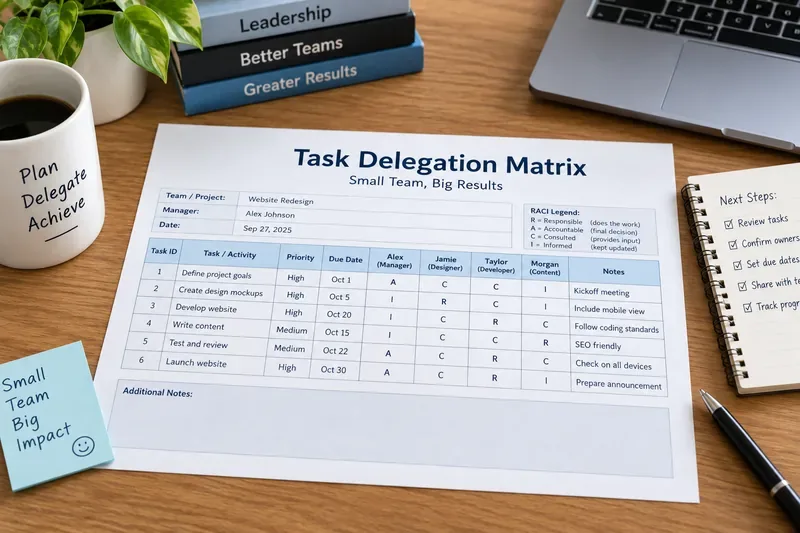
A printed delegation matrix makes ownership visible at a glance; for many small teams, the final Word version can be even simpler than this RACI-style example by focusing on one owner, decision limits, dates, and checkpoints.
A simple task delegation matrix you can recreate in Word
Start with a table like the one below. It is intentionally compact enough to fit on one printed page for many small teams.
Task or Outcome
Primary Owner
Decision Authority
Due or Review Date
Support or Checkpoint
Prepare weekly client status update
Maya
Draft and send without approval if scope has not changed
Friday, 3:00 p.m.
Escalate schedule or budget changes before sending
Review vendor quote
Jordan
Recommend; manager approves purchase
September 30
Bring two options if cost exceeds target
Publish scheduled social posts
Elena
Own within approved content calendar
Tuesday and Thursday
Ask for review only when claims or pricing change
Compile month-end metrics
Sam
Compile and analyze; manager signs off final report
Third business day
Flag missing finance data by end of day two
The exact wording is flexible. What matters is that the authority column describes a real boundary. “Own it” is vague if the employee still has to ask permission for every decision. “Recommend; manager approves purchases over $500” is much more usable.
Action: Copy the five headings into Word, then replace the sample rows with your team’s recurring work and current priorities. Keep the first version short enough that everyone can scan it without scrolling through pages of low-value detail.
Misconception 1: A delegation matrix is automatically a RACI matrix
Verified: They are not necessarily the same thing. The Project Management Institute defines a RACI matrix as a type of responsibility assignment matrix using four role labels: Responsible, Accountable, Consulted, and Informed. You can verify that definition in the PMI Lexicon of Project Management Terms.
A small-team delegation matrix can be narrower. If the manager’s main problem is “Who owns this task, what can they decide, and when do I check back?”, adding four RACI labels for every activity may create more structure than the team needs. RACI becomes more valuable when a task crosses functions and several stakeholders must be consulted or kept informed.
Action: Use the five-column delegation template when ownership and decision limits are the main problem. Add RACI roles only when stakeholder involvement is genuinely unclear.
Misconception 2: Delegating a task means the manager gives away all accountability
Verified in formal delegation systems: Delegating authority does not always remove responsibility from the person who delegated it. For example, the U.S. National Archives states in its organization and delegation directive that delegating functions does not relieve the Archivist of responsibility for administering those functions. That is a specific government policy, not a universal legal rule for every private business, but it illustrates an important management distinction between assigning authority and abandoning oversight. See the National Archives delegation directive.
Depends on context: Your actual legal, financial, HR, safety, or contractual accountability depends on your organization, role, industry, and local rules. A generic Word template cannot determine that for you.
Action: Add a clear escalation trigger for work with meaningful risk. For example: “Owner may approve routine refunds up to $100; manager approval required above $100 or for fraud concerns.”
Misconception 3: More columns create better control
Depends on the team: A matrix with priority, status, effort, dependency, risk, approver, reviewer, backup, department, budget, and notes may look thorough but can become slower to maintain than the work itself. For a small team, the matrix should answer the few questions that prevent dropped tasks and approval bottlenecks.
Microsoft Word supports ordinary tables, custom rows and columns, adjustable table properties, and landscape orientation. Microsoft’s current support material explains how to insert a table in Word, how to change table properties, and how to switch a document to landscape orientation. As of September 2026, Microsoft’s table support pages list current desktop Word versions including Microsoft 365 and recent perpetual releases, although exact controls can vary by platform.
Action: Start with five columns. Add a sixth column only when you can name the recurring decision it improves. If the table is too wide, try landscape orientation before shrinking the font.
Misconception 4: One named owner means nobody else can help
Depends on the work: Naming one primary owner is mainly about eliminating ambiguity. It does not mean the person must perform every subtask alone. A primary owner can still ask a subject-matter expert for input, request review, or hand off a specialized component.
The difference is that the team still knows who is expected to move the work forward. Without a primary owner, a task assigned to “Maya/Jordan/Elena” can easily become everyone’s responsibility in theory and no one’s responsibility in practice.
Action: Put one name in the Primary Owner column whenever possible. Use the Support or Checkpoint column to identify reviewers, backups, or specialists who contribute without replacing the owner.
Misconception 5: A Word delegation matrix is a complete task-management system
Verified: Word can create and format the table, and it can make long tables easier to print. For example, Microsoft documents a Repeat Header Rows feature for long tables that span multiple pages.
Not established by the template: A Word table does not inherently create task dependencies, automated reminders, workload balancing, approval workflows, or live status dashboards. Some organizations may combine Word with other Microsoft 365 services, but those workflows depend on the tools and configuration being used.
Action: Treat the Word matrix as a responsibility and authority record. If your team needs constant status changes, automated reminders, dependency tracking, or many simultaneous editors, use a more dynamic system for day-to-day execution and keep the delegation matrix as the higher-level reference.
Four practical authority labels for a small team
There is no single universal set of delegation levels for all businesses. The labels below are a practical template, not an official standard. They work because they describe what the employee may do before returning to the manager.
Authority Label
What It Means in This Template
Example Wording
Own and report
The owner decides and completes the work within agreed boundaries, then reports the result.
“Schedule routine customer calls and report outcomes Friday.”
Act within limits
The owner can decide independently until a stated threshold or exception appears.
“Approve replacements up to $100; escalate anything higher.”
Recommend, then confirm
The owner researches or prepares the decision, but the manager gives final approval.
“Compare vendors and recommend one; manager signs contract.”
Draft for review
The owner prepares a first version, often appropriate for unfamiliar or high-sensitivity work.
“Draft the new policy; review together before release.”
Action: Replace vague phrases such as “help with,” “handle,” or “take care of” with one of these authority patterns plus a concrete boundary.
How to set up the matrix in Word without overengineering it
This article is not dependent on a special Word template file. You can recreate the structure in a blank document using standard Word table features.
Create a five-column table. Microsoft documents the basic path as Insert > Table in current Word versions.
Put the task in the first column. Write an outcome that can be recognized as complete, such as “Send weekly customer summary,” not a broad area such as “Customers.”
Name one primary owner. Avoid team names unless the whole team truly acts as one operating unit.
Write the decision boundary. State whether the owner may decide, recommend, draft, or must obtain approval.
Add a due date or review date. For ongoing work, a recurring review date is often more useful than a fake final deadline.
Use the last column for exceptions. Put escalation triggers, reviewers, required inputs, or backup coverage there.
If the table becomes wide, Microsoft’s current desktop Word instructions allow switching to Layout > Orientation > Landscape. If it grows beyond one page, repeating the header row can preserve context on later pages.
Action: After building the first version, print or preview it at normal size. If people have to squint, shorten the text or move detailed procedures out of the matrix rather than reducing readability.
When should you add Priority or Status columns?
Priority is useful when the team regularly faces more work than it can complete at once and needs an agreed ordering. A simple High, Medium, Low scale may be enough, but only if the manager actually uses it to resolve conflicts.
Status is useful when the document is reviewed frequently enough to remain current. If the Word file is updated only once a month while tasks change every day, a status column can create false confidence.
Action: Add Priority when competing work is a recurring problem. Add Status only if someone is clearly responsible for keeping it current.
When a Word delegation matrix is the right choice
A Word-based matrix is a strong fit when the team wants a clean printable document, responsibilities are reasonably stable, the manager prefers a one-page review during meetings, or the file needs to be stored alongside policies, onboarding documents, or project briefs.
It is a weaker fit when tasks are highly dynamic, hundreds of assignments are active, deadlines need automatic reminders, multiple teams depend on each other, or management needs real-time workload data.
Action: If the matrix stays readable and current with a brief weekly review, Word is probably sufficient. If the team spends more time reconciling versions and chasing updates than discussing the work, move execution tracking to a shared task system.
A five-minute weekly review that keeps the matrix useful
The matrix should not become a document that is created once and forgotten. A short weekly review can focus on exceptions rather than reading every row aloud.
Remove or mark completed one-time tasks.
Confirm that every active task still has one primary owner.
Check whether any decision limit is causing unnecessary approval delays.
Update review dates for recurring work.
Add new escalation triggers discovered during the week.
Confirm that reassigned work is actually understood by the new owner.
Action: End the review by asking each owner whether anything in the matrix would cause two reasonable people to interpret the assignment differently. Fix those rows first.
Self-check before you share the template with your team
Your delegation matrix is ready when you can answer “yes” to these questions:
Does every important task or outcome have one clearly named primary owner?
Can that owner tell what decisions are allowed without asking for permission?
Is there a date for delivery, review, or the next checkpoint?
Are escalation triggers clear for money, customer impact, quality, safety, legal issues, or major scope changes where relevant?
Can the table be read comfortably on screen and in print?
Does the document avoid pretending to track live status if nobody will keep it current?
Have you separated the delegation matrix from detailed procedures that belong elsewhere?
If any answer is “no,” the fix is usually not another decorative field. Clarify the owner, the authority boundary, or the review point.
Bottom line
For a small team manager, a simple task delegation matrix in Word should reduce ambiguity rather than create paperwork. Start with five columns, give each task one primary owner, write the real decision boundary, set a due or review date, and record only the support or escalation information that changes how the work gets done.
Use RACI when you genuinely need to map Responsible, Accountable, Consulted, and Informed roles across stakeholders. Use a simpler delegation matrix when the real need is faster day-to-day clarity. And remember that the template itself cannot determine legal accountability, approval authority, or risk limits for your organization; those must come from your actual policies, contracts, and management structure.