Home
» Tips
»
Minimalist Investor Pitch Deck PowerPoint Template for Tech Startups: What to Include and What to Leave Out
Minimalist Investor Pitch Deck PowerPoint Template for Tech Startups: What to Include and What to Leave Out
A minimalist investor pitch deck should remove friction, not remove evidence. The strongest use of a clean PowerPoint template is to make the company’s argument easier to follow: what problem exists, why the startup is positioned to solve it, what proof already exists, how the business can grow, and what the company is asking investors to fund.
That sounds simple, but “minimalist” is often misunderstood. It does not mean using almost no text, forcing every startup into the same ten slides, hiding assumptions behind large market numbers, or replacing evidence with polished design. A template can improve consistency and readability; it cannot prove product-market fit, make a projection reliable, or determine whether a fundraising communication complies with securities law.
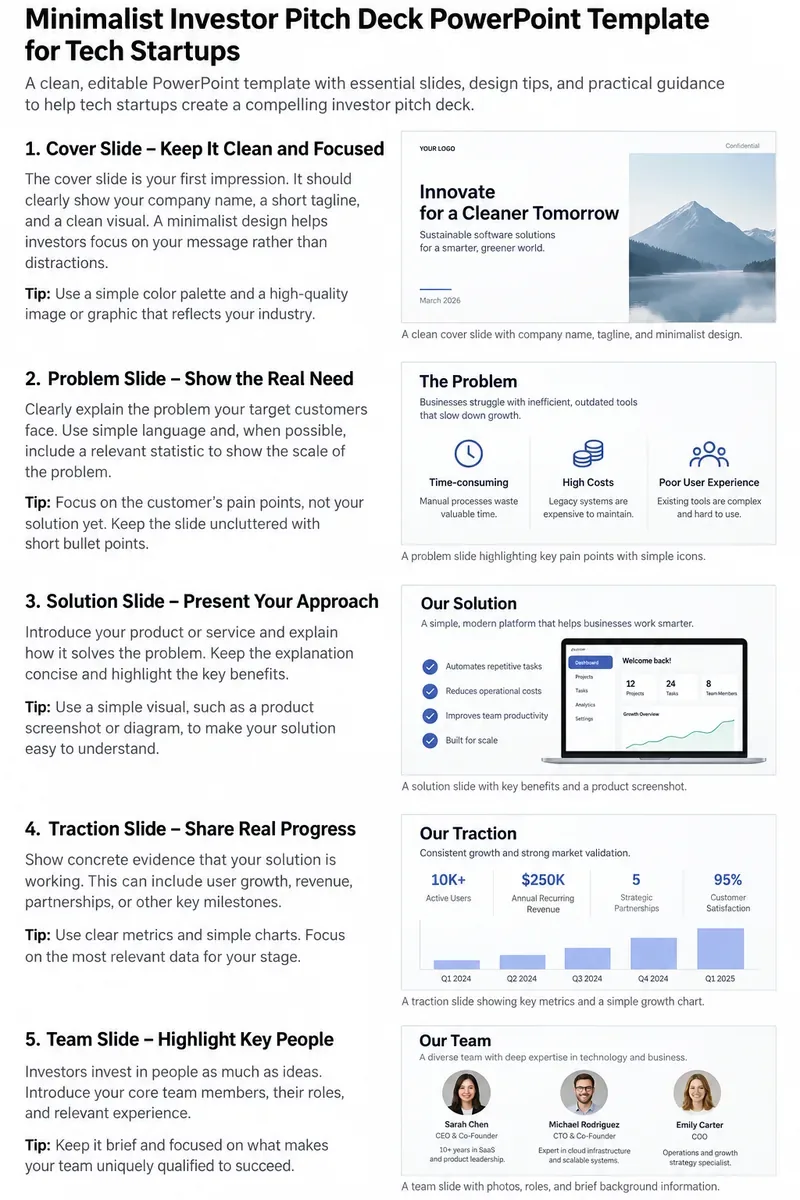
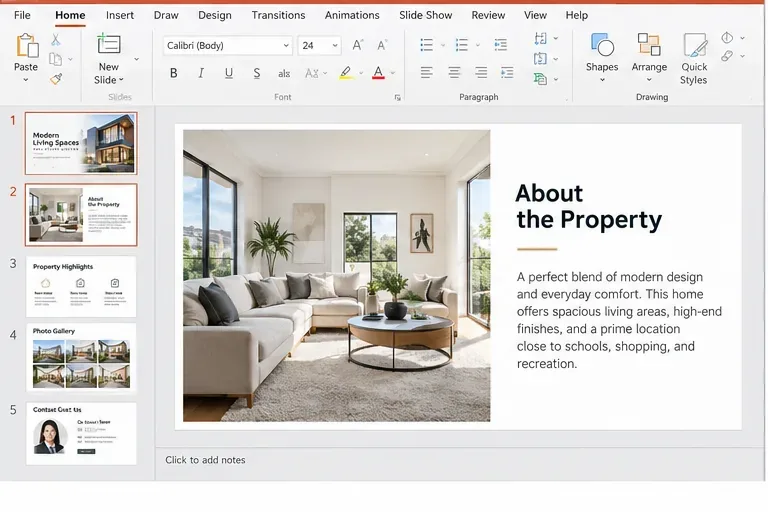
Example minimalist pitch-deck layouts for a tech startup. The traction figures and company details shown are illustrative placeholders and should be replaced with verified startup data.
First, what is a PowerPoint template actually supposed to do?
Verified: Microsoft distinguishes a PowerPoint theme from a PowerPoint template. A theme is the coordinated set of colors, fonts, backgrounds, and effects. A template combines that design system with sample layouts and content for a particular purpose. Microsoft also documents that a reusable PowerPoint template is saved as a .potx file and is built by modifying the Slide Master and its associated layouts. See Microsoft’s explanation of PowerPoint templates and themes and guide to creating and saving a PowerPoint template.
What depends on your startup: The content placeholders you build into that template should reflect the fundraising stage, business model, product complexity, and evidence you actually have. A pre-revenue developer-tools startup does not need the same emphasis as a growth-stage SaaS company with audited revenue history.
Action: Treat the template as a reusable visual system, not as a script. Build the fonts, colors, title positions, chart style, page number, logo placement, and common layouts into Slide Master. Keep the story editable.
Misconception 1: “Minimalist” means using fewer slides and almost no words
Not verified as a universal rule: There is no official PowerPoint or securities rule saying an investor deck must have a specific slide count. Minimalism is better understood as visual hierarchy: each slide should have a clear job, unnecessary decoration should disappear, and the viewer should know what to notice first.
For readability, Microsoft’s current accessibility guidance recommends accessible templates, strong contrast, descriptive slide titles, and generally favors simple layouts. Its guidance for accessible templates also recommends sans-serif fonts at 18 points or larger. That is an accessibility recommendation, not an investor-deck law, but it is a useful lower-bound check when a founder is tempted to squeeze a spreadsheet onto one slide. Review Microsoft’s PowerPoint accessibility guidance.
Action: Give each slide one primary message. If a slide requires 8-point text to fit, split the material, move supporting detail to the appendix, or replace prose with a chart whose source and meaning are clear.
Misconception 2: Every tech startup should use the same pitch-deck order
Depends on context: A standard structure can save time, but slide order should follow the question an investor is likely to ask next. For one startup, product demo and technical defensibility may need to appear early. For another, traction may be the strongest opener after the problem and solution.
A practical starting sequence is shown below. It is a template structure, not a universal fundraising standard.
Slide
What the investor should learn
Minimalist content
Cover
Who you are and what category you are building
Company name, one-line description, presenter, date
Problem
What painful, expensive, risky, or inefficient condition exists
One clear problem statement plus verified evidence
Solution
What your product does differently
Product visual, workflow, or short value proposition
Why now
Why the opportunity is becoming possible or urgent
One or two verified market, technology, or regulatory shifts
Product
What users actually experience
Real screenshots, architecture summary, or product flow
Market
Who can buy and how the opportunity is estimated
Target segment and transparent assumptions
Business model
How the company makes or expects to make money
Pricing unit, customer, margin logic, sales motion
Go-to-market
How customers are acquired
Channels, sales cycle, partnerships, or distribution advantage
Traction
What has been proven so far
Revenue, usage, retention, pilots, pipeline, or technical milestones
Competition
What alternatives exist and why customers may choose you
Focused comparison using decision-relevant criteria
Team
Why this team can execute
Names, roles, and only the experience relevant to the thesis
Financial plan
What the operating model assumes
Key drivers, runway, and clearly labeled projections
Raise and use of funds
What you are raising and what milestones it should finance
Amount, runway target, and major uses of proceeds
Appendix
Answers to deeper diligence questions
Cohorts, unit economics, security, technical details, references
Action: Put your strongest verified evidence earlier. If an important slide exists only because “every pitch deck has one,” either rewrite it to answer a real investor question or move it to the appendix.
Misconception 3: A large market number is enough to make the opportunity credible
Verified concern: The SEC’s investor education materials explicitly tell investors in private placements to examine whether claims and expectations are reasonable, who the competitors are, what management’s background is, and how the company intends to use the money raised. The SEC also notes that private placements may provide less disclosure than registered offerings. See the Investor.gov bulletin on private placements.
What is not known from the template: A $10 billion industry estimate does not tell an investor how much of that market the startup can realistically reach, at what price, through which channel, or over what time period.
Action: Pair any top-down market figure with a bottom-up model: number of target accounts, expected annual contract value, realistic penetration assumptions, and the source date. Put citations or short source notes directly on the slide or in the appendix.
Misconception 4: Projections belong on the slide without explaining assumptions
Depends on stage: Early-stage companies often need to show a forward operating plan because historical financials may be limited. That does not make forecasts factual. Revenue, hiring, gross margin, customer acquisition, and runway projections are outputs of assumptions.
Verified legal context in the United States: The SEC states that offers and sales of securities by private companies are regulated and must be registered or rely on an available exemption. It also explains that what constitutes an “offer” can be broader than a signed financing document and may include publicity that conditions interest in an offering. Review the SEC’s Private Companies and the SEC resource, last reviewed in April 2026.
This article is not legal advice. The important deck-design lesson is that polished charts do not turn assumptions into facts.
Action: Label actuals and forecasts separately. Add the two or three operating assumptions that drive the model, such as paid customers, average contract value, churn, gross margin, or planned headcount. For an active financing, have qualified counsel review offering communications and the exemption being used.
Misconception 5: A “Confidential” footer makes sensitive information protected
Not established by the template: Adding “Confidential” to Slide Master can signal handling intent, but the word alone does not tell you what legal protection exists in a specific relationship or jurisdiction. Investors may also share decks internally with partners, analysts, counsel, or advisers.
Action: Do not place source code, passwords, customer secrets, unreleased security details, or irreplaceable trade-secret information in a general pitch deck. Use a controlled diligence process for material that truly requires restricted access, and get legal advice when confidentiality is important.
How should a minimalist PowerPoint template be built?
Use Slide Master for consistency rather than manually formatting every slide. Microsoft documents that the Slide Master can control colors, fonts, headings, logos, placeholders, and other styles across layouts. See Microsoft’s Slide Master guidance.
Use a small layout system
A useful startup template may need only six to eight reusable layouts:
title or cover;
statement plus supporting evidence;
two-column text and product visual;
single chart with annotation;
three or four metric cards;
comparison table or competitive landscape;
team profiles;
appendix detail.
Action: Remove redundant layouts from the master. Fewer layout choices make it harder for team members to drift into inconsistent spacing and typography.
Choose type for readability before personality
Custom fonts can reinforce brand identity, but they introduce sharing risk if the recipient does not have the font. Microsoft supports embedding fonts in PowerPoint. Its documentation notes that “Embed all characters” is preferable when other people need to edit the presentation, while embedding only used characters can reduce file size. See Microsoft’s font-embedding guidance.
Action: Either use widely available fonts or test font embedding on another computer before sending the editable deck. Do not discover during a partner meeting that the typography has reflowed and moved chart labels off the slide.
Keep the palette small, but preserve contrast
Minimalist does not mean gray-on-gray. Use one neutral background, one primary text color, one accent, and an additional semantic color only when it communicates meaning. Microsoft’s accessibility guidance recommends sufficient contrast and warns against relying on color alone to communicate information.
Action: Test the deck in grayscale or with an operating-system color filter. If a red and green chart becomes unreadable without color, add direct labels, shapes, or patterns.
What belongs on a traction slide?
Traction should show progress relevant to your business model. It may be recurring revenue, active users, retention, contracted pilots, transaction volume, qualified enterprise pipeline, model performance against a fixed benchmark, regulatory progress, or another measurable milestone.
What depends on context: There is no single traction metric that fits a consumer app, semiconductor company, biotech startup, enterprise SaaS business, or foundation-model company.
Action: Show the metric investors would use to test your central claim. Label the period, unit, and definition. If a number is annualized, unaudited, pipeline rather than closed revenue, or based on a subset of customers, say so.
What belongs on the competition slide?
A minimalist competition slide should not declare “no competitors.” Even when no direct company offers the same product, customers usually have alternatives: spreadsheets, internal development, incumbent software, outsourcing, manual labor, or simply doing nothing.
Action: Compare the options against three to five purchase criteria that customers actually care about. Explain the source of your advantage, then use the appendix for technical evidence such as benchmark methodology, patents, switching costs, proprietary data rights, or integration depth.
How should you show the funding ask?
A clean “ask” slide usually needs more than a round size. Connect capital to milestones. For example, a founder might show that a proposed raise is intended to finance a specified runway while funding product release, defined hiring, regulatory work, or a go-to-market milestone.
Verified context: SEC investor education materials specifically tell private-placement investors to examine how an issuer plans to use the money raised. That makes “use of proceeds” a substantive question, not decorative pitch-deck content.
Action: Show the amount sought, expected runway under your current plan, major use-of-funds categories, and the milestones the capital is intended to unlock. Do not imply that future financing or projected milestones are guaranteed.
Should you send PPTX or PDF?
Depends on the purpose: Keep the .pptx as the editable source. For a static version, Microsoft documents exporting a presentation to PDF, which freezes the formatting and layout so the recipient can view the slides without PowerPoint and cannot edit them in the same way. See Microsoft’s PowerPoint-to-PDF guidance.
Action: Maintain one controlled editable deck, then export the exact version you intend to send. Open the PDF yourself and check charts, links, page order, footnotes, and confidential material before distribution.
Do accessibility details matter in an investor deck?
Yes. Accessibility improvements often make a deck easier for everyone to read. Microsoft recommends unique slide titles, logical reading order, sufficient contrast, accessible hyperlink text, and alternative text for meaningful visuals. PowerPoint also includes an Accessibility Checker.
Action: Run Review > Check Accessibility before sending. Add concise alt text to meaningful product images and charts, and do not make color the only way an investor can distinguish two data series.
A practical final review before you send the deck
Every number has a definition. Revenue, users, retention, pipeline, and market size are labeled clearly.
Actuals and projections are visibly different. No forecast is styled as if it already happened.
Market claims have sources and dates. The appendix contains methodology where necessary.
The product slide uses real product material. Do not substitute aspirational mockups without identifying them as such.
The slide titles tell the story. Reading only the titles should reveal the narrative arc.
The font is readable at presentation distance. Important caveats are not hidden in microscopic footnotes.
The ask connects to milestones. The deck explains what new capital is intended to accomplish.
The design is consistent. Colors, type, spacing, charts, and page furniture come from the master layouts.
Nothing sensitive is present by accident. Remove comments, hidden slides, credentials, customer-confidential details, and obsolete appendix pages.
The exported copy has been reviewed. Check both PPTX and PDF on another device when possible.
Bottom line
A minimalist investor pitch deck PowerPoint template is valuable because it makes decisions visible: what evidence deserves a slide, what belongs in the appendix, and what should be removed. The template should provide repeatable layouts, a restrained design system, readable type, and room for real data. It should not force the company into a generic story or disguise uncertainty.
Build the master once, then spend most of your time on evidence. Replace every placeholder with verified startup information, label assumptions, explain the use of funds, and keep the deck easy to audit. That is what turns a minimalist template from a visual style into a useful fundraising communication tool.