A printable weekly cleaning schedule can make hosting more consistent, but new hosts should understand one point before using any Monday-through-Sunday template: a weekly schedule does not replace turnover cleaning between reservations. A turnover clean is the cleaning and reset performed after one guest checks out and before the next guest checks in. Airbnb's current ground rules for home hosts state that listings should be clean and free of health hazards before check-in, and that hosts should clean between every stay. See Airbnb's Ground rules for home hosts.
A weekly schedule is best used as a second layer: it organizes recurring maintenance, deep-clean rotation, supply checks, and tasks that are easy to miss during a fast turnover. Airbnb's April 2026 hosting guidance also recommends creating a consistent cleaning routine, using checklists, keeping backup linens, and planning regular deep cleaning. See Airbnb's guidance on optimizing a hosting routine.
Action: treat the template below as a weekly operations organizer, while keeping a separate turnover checklist that must be completed before each new guest arrives.
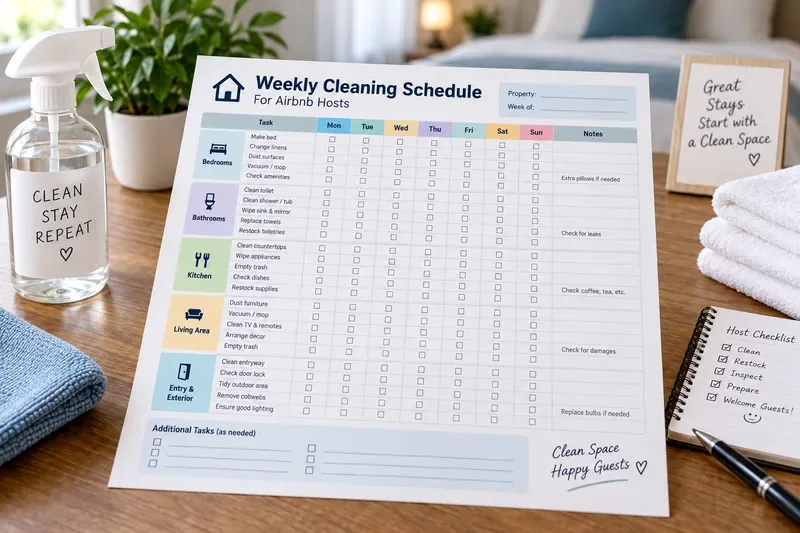
AI-generated illustration of a printable Airbnb-host cleaning schedule; it is not an official Airbnb form or a photograph of a specific rental property.
What a new Airbnb host should know before making the schedule
Cleaning, sanitizing, and disinfecting are not the same task
Cleaning removes dirt, debris, and many germs with soap or detergent and water. Sanitizing reduces germs to levels considered safe under applicable public-health standards. Disinfecting uses chemicals to kill remaining germs on surfaces. The CDC says that in most home situations, routine cleaning is usually sufficient and that disinfection is especially relevant when someone is sick or has recently been sick. The CDC also says surfaces should be cleaned before sanitizing or disinfecting. See CDC cleaning and disinfecting guidance.
This distinction matters because a checklist that says “disinfect everything every day” may add unnecessary chemical use without reflecting current public-health guidance. The right approach depends on the property, recent guest circumstances, local requirements, and product directions.
Action: label tasks accurately in your schedule. Use “clean” for routine soil removal, and reserve “disinfect” for situations where it is appropriate. Always follow the product label.
There is no single universal Monday-through-Sunday Airbnb cleaning rule
The official Airbnb materials reviewed for this article emphasize cleanliness before check-in, cleaning between stays, consistent routines, deep cleaning, restocking, and safety maintenance. They do not prescribe one universal weekly timetable that every host must follow. A city apartment with two-night stays, a beach house with weekly bookings, and a rural cabin with a hot tub will need different schedules.
Action: customize the day assignments around your booking pattern instead of copying a generic schedule exactly.
Local laws and property features can add requirements
Airbnb requires hosts to comply with applicable laws and safety regulations. Its safety guidance says hosts should address known hazards and maintain working smoke and carbon monoxide alarms where applicable. Requirements can vary by location and property type. See Airbnb's home safety requirements.
Action: add property-specific tasks for pools, hot tubs, fireplaces, grills, elevators, septic systems, accessibility equipment, or other amenities only after checking the applicable manufacturer instructions and local rules.
What to prepare before you print the template
You do not need a complicated housekeeping system to start. Gather four pieces of information first:
Your room and amenity list: bedrooms, bathrooms, kitchen, living areas, entry, outdoor spaces, laundry area, and any special amenities.
Your turnover standard: the tasks that must happen after every guest stay, regardless of the weekday.
Your weekly maintenance tasks: jobs that can rotate through the week, such as checking under furniture, cleaning appliance interiors, inspecting drains, or restocking backup supplies.
Your responsibility list: who completes each task—the host, co-host, cleaner, maintenance person, or another vendor.
Airbnb's current preparation guidance tells hosts to refresh every room, focus on kitchens and bathrooms, and use cleaning checklists so tasks are not missed between guests. See Airbnb's April 2026 guidance on preparing a home for guests.
Action: walk through the property once as if you were a first-time guest. Write down anything that could be dirty, empty, damaged, difficult to use, or inconsistent with the listing description.
Printable weekly cleaning schedule template
The table below is designed to be copied into Microsoft Word, adjusted for your property, and then printed or saved as a PDF. A blank box means the task can be assigned on the day that fits your reservation calendar. “Every turnover” means it should be performed whenever one stay ends and another guest is due to arrive, not merely once a week.
Area / Task
Frequency
Mon
Tue
Wed
Thu
Fri
Sat
Sun
Owner / Notes
Strip used beds and replace with clean linens
Every turnover
□
□
□
□
□
□
□
Replace used towels
Every turnover
□
□
□
□
□
□
□
Dust reachable bedroom surfaces and check for hair
Every turnover
□
□
□
□
□
□
□
Inspect mattress protector, bed frame, and under-bed area
Weekly rotation
□
□
□
□
□
□
□
Clean toilet, sink, shower, and tub
Every turnover
□
□
□
□
□
□
□
Check bathroom drains, grout, leaks, and exhaust fan
Weekly rotation
□
□
□
□
□
□
□
Clean counters, sink, and cooking surfaces
Every turnover
□
□
□
□
□
□
□
Check refrigerator for leftover food
Every turnover
□
□
□
□
□
□
□
Clean appliance interiors as needed
Weekly rotation
□
□
□
□
□
□
□
Wash and put away dishes, cookware, and utensils
Every turnover
□
□
□
□
□
□
□
Vacuum or sweep and mop floors
Every turnover
□
□
□
□
□
□
□
Dust under furniture and hard-to-reach surfaces
Weekly rotation
□
□
□
□
□
□
□
Empty trash and recycling
Every turnover
□
□
□
□
□
□
□
Restock soap, toilet paper, and guest essentials
Every turnover / as needed
□
□
□
□
□
□
□
Count backup linens and cleaning supplies
Weekly
□
□
□
□
□
□
□
Check entry, door hardware, lockbox, or smart-lock condition
Every turnover / weekly
□
□
□
□
□
□
□
Inspect for visible damage, pests, moisture, or mold
Every turnover
□
□
□
□
□
□
□
Test smoke / CO alarms according to manufacturer and local requirements
Scheduled maintenance
□
□
□
□
□
□
□
Final guest-ready walkthrough
Every turnover
□
□
□
□
□
□
□
Action: delete rows that do not apply to your property and add rows for amenities you actually advertise. A shorter accurate checklist is more useful than a long generic one.
A beginner-friendly weekly rotation
If you are unsure how to distribute the deeper tasks, use this as a starting pattern. Move tasks when bookings make a particular day impractical.
Day
Suggested focus
Examples
Monday
Bedrooms and linen inventory
Inspect mattress protectors, count spare sheets, dust under beds
Tuesday
Kitchen detail work
Inspect refrigerator seals, clean appliance interiors as needed, organize guest supplies
Wednesday
Bathrooms
Check drains, grout, caulk, leaks, exhaust fans, and backup toiletries
Thursday
Living areas
Clean under furniture, check lamps, remotes, décor, and high dust points
Friday
Entry and exterior
Check lighting, door hardware, porch condition, windows, and visible cobwebs
What depends on your situation: these weekday assignments are workflow suggestions, not Airbnb requirements. A host with frequent weekend turnover may prefer to do supply counts on Thursday, while a property with long stays may use housekeeping windows agreed with guests.
Action: move the rotation around your actual check-in and checkout pattern for the next four weeks, then keep the version that creates the fewest rushed tasks.
How to make the Word version practical
Microsoft Word can create both printable checkboxes and interactive checkboxes. Microsoft documents two approaches: a print-only list can use an open-box symbol as the bullet, while an interactive checklist can use check box content controls. See Microsoft Support: Make a checklist in Word.
For a host schedule, a simple table is usually easier to print and initial. Keep the editable .docx file as your master copy. Put the property name, week-of date, cleaner name, and emergency or maintenance contact information at the top. If several cleaners work on the same property, add an “Initials” or “Completed by” field instead of relying on checkmarks alone.
Action: in Word, set the page to landscape orientation if the seven weekday columns feel crowded, preview the page, and reduce unnecessary notes before shrinking the text.
Why keep both Word and PDF versions?
The Word file is the editable master. The PDF is the print-ready or share-ready version. Microsoft says Office desktop apps can save or convert files to PDF, and PDF is intended to preserve layout for reading and printing. Microsoft also warns that opening a PDF in Word for editing may not preserve perfect page-to-page formatting. See Microsoft Support: Save or convert to PDF or XPS.
Action: make changes in the original Word document, then export a new PDF. Avoid treating the PDF as your long-term editable master.
How to print without cutting off the schedule
Microsoft's current Word printing guidance recommends using the print preview before printing and allows you to select pages and other printer settings. See Microsoft Support: Print a document in Word.
For a wide weekly table, common problems are tiny text, missing right-hand columns, and unexpected page breaks. These are layout issues, not cleaning-schedule issues.
Action: open File > Print, inspect the full preview, and confirm that the Sunday and Notes columns are visible before you print multiple copies.
Five mistakes new hosts should avoid
1. Cleaning only once a week
This is the biggest misunderstanding the template can create. Airbnb requires guest turnover cleaning between stays. A beautiful Sunday checklist does not make a Wednesday check-in guest-ready.
Action: mark turnover tasks separately from weekly rotation tasks.
2. Making every task “daily”
Overloading the sheet creates checkbox fatigue and makes it harder to see what actually matters. Some jobs belong to every turnover, some are weekly, and some follow a manufacturer or maintenance schedule.
Action: give every row an explicit frequency.
3. Using disinfectant as a substitute for cleaning
The CDC recommends cleaning surfaces first. It also warns against mixing bleach or disinfectants with other cleaners because dangerous vapors can result. See CDC guidance on cleaning and disinfecting with bleach.
Action: keep product instructions available to the cleaner and never create homemade chemical combinations in the checklist.
4. Checking boxes without inspecting condition
“Clean bathroom” can be checked even while a slow leak, cracked fixture, or depleted soap supply is missed. Cleaning and inspection are related but different activities.
Action: add condition checks for leaks, mold, pests, damage, batteries, and supplies instead of hiding them inside broad cleaning rows.
5. Forgetting the final walkthrough
Airbnb's hosting guidance recommends consistent routines precisely because small details can be overlooked. A final walkthrough is the moment to catch an unmade bed, leftover trash, a missing towel, an empty soap bottle, or an item that does not match the listing presentation.
Action: assign the final walkthrough to one named person and complete it as close to guest readiness as your workflow allows.
Safety checks belong on the schedule, but not all are weekly
Airbnb strongly urges hosts to install smoke and carbon monoxide alarms as appropriate, test them regularly, and comply with local regulations. The exact testing and replacement intervals should follow the device manufacturer and applicable rules rather than an invented universal weekly frequency. See Airbnb's safety guidelines for hosts.
Action: use the weekly sheet as a reminder that safety maintenance exists, but keep the actual interval in a separate maintenance log with the device model, installation date, test date, and next required action.
What the finished template should look like
A good printable schedule should be easy to understand in under a minute. At the top, include the property name, week, and responsible cleaner. In the main table, group tasks by room or function. Give each task a frequency, a checkbox area, and enough space for initials or exceptions. At the bottom, include a small “Issues found” section for damage, missing inventory, or maintenance that cannot be resolved during cleaning.
Avoid putting guest names, access codes, passwords, or payment information on a sheet that may be printed, photographed, or left at the property. If a cleaner needs access instructions, manage those securely outside the public-facing cleaning checklist.
Action: print one test copy, carry it through a real turnover, and circle every row that is unclear, redundant, or missing. Revise the Word master before exporting the final PDF.
Simple setup for your first week
Create one turnover checklist that is completed between every reservation.
Use the weekly template for deep-clean rotation, restocking, inspection, and planning.
Keep the Word file as the editable master and export a PDF when you need a stable print copy.
Assign tasks by person, not just by day, when more than one cleaner or co-host is involved.
Record maintenance problems separately so they do not disappear when a new weekly sheet is printed.
Review the schedule after several real turnovers and remove steps that add no operational value.
The goal is not to create the longest Airbnb cleaning checklist. It is to build a repeatable system that makes every turnover dependable while giving slower, less urgent maintenance work a place in the week. Once the basic routine is stable, the printable Word and PDF versions can become a simple handoff document for you, your co-host, or your cleaning team.