Home
» Tips
»
Independent Contractor Expense Tracker Template for US Freelancers: What to Track in 2026
Independent Contractor Expense Tracker Template for US Freelancers: What to Track in 2026
One 2026 update makes a well-designed independent contractor expense tracker more important than usual: the IRS changed the business standard mileage rate in the middle of the year. Business mileage is 72.5 cents per mile for January 1 through June 30, 2026, and 76 cents per mile for July 1 through December 31, 2026. That means a freelancer who uses a single annual mileage-rate cell can calculate the wrong amount. A 2026 tracker should store the trip date and apply the rate for the correct period. See the IRS standard mileage rates and IRS Announcement 2026-11.
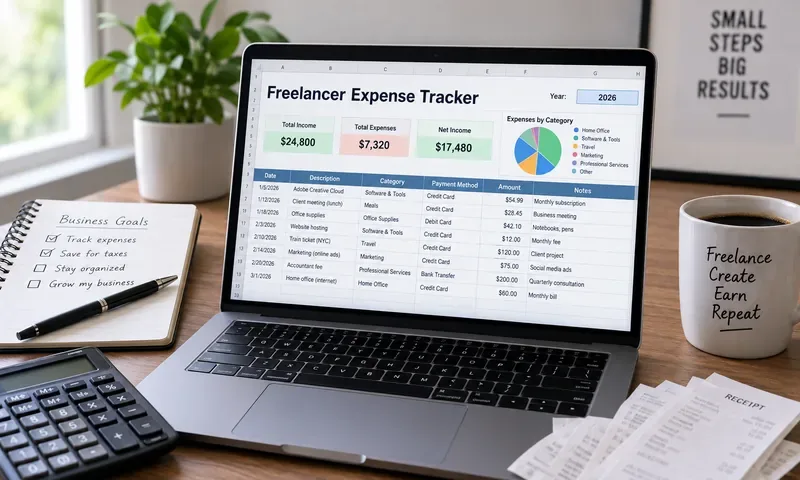
AI-generated illustration of a freelancer organizing business expenses; it is not a screenshot of IRS software or tax-filing software.
The best independent contractor expense tracker is not necessarily the most detailed one. A solo consultant with 20 transactions a month needs something different from a photographer buying equipment, a rideshare driver logging hundreds of trips, or a freelancer who regularly pays subcontractors. The useful question is: what level of tracking gives you reliable records without creating so much maintenance that you stop using it?
This article provides a practical template structure for U.S. freelancers and explains the tradeoffs among a minimal spreadsheet, a Schedule C-oriented workbook, a receipt-and-mileage system, and full accounting software. It is designed for organization and tax preparation, not as personalized tax advice.
What should an independent contractor expense tracker actually do?
At minimum, the tracker should clearly show what you spent, when you spent it, why it was business-related, how you categorized it, and where the supporting document can be found. The IRS says businesses may generally choose any recordkeeping system that clearly shows income and expenses. It also emphasizes that records should support amounts reported on a tax return. See the IRS recordkeeping guidance and Publication 583, Starting a Business and Keeping Records.
A tracker should not try to replace tax law with automatic rules. For example, a $120 restaurant charge is not automatically a $60 deduction simply because a spreadsheet labels it “Meals.” First determine whether the expense qualifies as a business meal and whether an exception applies; then apply the appropriate deductible percentage. Likewise, a home internet bill may have both personal and business use. The spreadsheet should preserve the original amount and separately record the business-use percentage or deductible amount.
Which tracker format fits your freelance business?
Format
Best for
Main advantage
Main tradeoff
Minimal one-sheet expense log
Low-volume freelancers with simple expenses
Fast to maintain and easy to understand
Weak for mileage, receipts, reimbursements, and mixed-use expenses
Schedule C-oriented workbook
Consultants, designers, developers, writers, and other sole proprietors
Makes year-end tax organization easier
Requires thoughtful category setup and periodic review
Expense + receipt + mileage workbook
Freelancers who drive, travel, buy equipment, or incur client expenses
Stronger substantiation and better audit trail
More data entry and more sheets to maintain
Accounting software with bank feeds
Higher transaction volume, multiple accounts, invoicing, or subcontractors
Automation, reconciliation, and richer financial reporting
More setup, possible subscription cost, and still requires correct categorization
Recommendation: use the simplest system that captures every field your real expenses require. If you rarely drive and have mostly software subscriptions and office expenses, a Schedule C-oriented spreadsheet is usually more practical than building a complex bookkeeping system. If you have frequent mileage, reimbursable client costs, equipment, or many accounts, a multi-sheet workbook or accounting platform reduces the risk of losing important detail.
A strong general-purpose workbook can use four sheets: Expenses, Mileage, Monthly Summary, and Reference. Add a separate Home Office sheet only if you actually need it.
1. Expenses sheet: the core transaction log
Column
What to enter
Why it matters
Date
Transaction date
Places the expense in the correct tax year and reporting period
Vendor / Payee
Business or person paid
Helps match receipts, statements, and invoices
Description
What was purchased
Makes the transaction understandable later
Business Purpose
Why the expense was connected to your freelance work
Provides context that a bank statement alone may not show
Client / Project
Optional project name or customer
Useful for profitability and reimbursement tracking
Category
Schedule C-friendly or internal category
Supports year-end grouping
Amount Paid
Full transaction amount
Preserves the original economic event
Business Use %
100%, 75%, etc., when allocation is appropriate
Separates mixed personal/business costs
Deductible %
Percentage applied after determining tax treatment
Useful for meals and other limited deductions
Deductible Amount
Calculated or reviewed amount
Lets summaries use the tax-relevant amount without changing the original spend
Payment Account
Business card, bank account, cash, etc.
Helps reconciliation
Receipt / Document
File name, cloud link, or receipt ID
Connects the row to supporting evidence
Reimbursable?
Yes / No
Prevents client costs from being confused with your own unreimbursed costs
Reimbursed?
Yes / No / Date
Helps avoid double counting
Notes
Any special facts
Useful for ambiguous or unusual transactions
The “Business Purpose” and “Receipt / Document” fields are worth keeping even if they feel redundant. Publication 583 explains that receipts, invoices, bills, and account statements are supporting documents, but proof of payment by itself does not necessarily establish that an expense qualifies for a deduction. A short business-purpose note can preserve context you may not remember months later.
2. Mileage sheet: separate it from ordinary expenses
For freelancers who drive for business, use a dedicated mileage sheet instead of mixing trips into the general expense log. Suggested columns are:
Date
Starting location
Destination
Business purpose
Client or project
Business miles
Applicable mileage-rate period
Rate
Calculated standard-mileage amount
Parking and tolls, when separately tracked and applicable
Notes
For 2026, the rate field should be date-sensitive: $0.725 per business mile through June 30 and $0.76 per business mile beginning July 1. Do not overwrite the first-half rate when updating the workbook for the second half of the year. The IRS describes the standard mileage rate as optional; taxpayers may instead use eligible actual vehicle costs subject to the applicable rules. Review Publication 463, Travel, Gift, and Car Expenses before choosing a method.
3. Monthly Summary sheet: useful for decisions, not just taxes
A monthly summary should show total gross expenses, deductible expenses, and category totals. This lets you answer operating questions such as: Are software subscriptions increasing? Is travel producing enough client revenue to justify the cost? Are subcontractor payments becoming large enough that you need a more formal bookkeeping workflow?
Keep tax reserves and estimated tax payments in a separate cash-planning section rather than blending them into the Schedule C operating-expense total. Independent contractors generally report business income and expenses on Schedule C, while self-employment tax is calculated separately on Schedule SE. The IRS also notes that self-employed people may need to make estimated tax payments. See the IRS guidance for independent contractors and self-employed workers and IRS Topic No. 554 on self-employment tax.
4. Reference sheet: prevent category drift
The reference sheet should define what each category means in your business. This matters because freelancers often create several labels for the same thing: “Software,” “Apps,” “Subscriptions,” and “Online tools.” Without a reference list, the annual summary can become fragmented.
You can also map internal categories to tax-return categories. For example, “Design software,” “Cloud hosting,” and “Project management” might stay separate for management reporting while mapping to an appropriate tax category after review. The goal is not to force every purchase into a tax line at the moment of purchase; it is to preserve enough information to classify it correctly later.
How closely should your categories match Schedule C?
There is a useful tradeoff here. A tracker that mirrors tax-form categories exactly can make return preparation easier, but it may be poor for running your business. A graphic designer may want “Fonts,” “Stock assets,” “Adobe tools,” and “Printing,” while Schedule C uses broader expense lines. A contractor may care about job materials, tools, vehicle costs, subcontractors, and permits.
A practical approach is to maintain two fields:
Management Category: the label that makes sense for how you run the business.
Tax Category: the Schedule C or tax-preparation grouping selected during review.
The current finalized Schedule C instructions I verified while researching this article are the 2025 instructions. They include common lines such as advertising, car and truck expenses, commissions and fees, contract labor, depreciation, insurance, legal and professional services, office expense, rent or lease, repairs and maintenance, supplies, taxes and licenses, travel, deductible meals, utilities, and other expenses. Use the final instructions for the tax year you are actually filing rather than assuming the line structure will never change. See the IRS Instructions for Schedule C.
Three expense-tracking choices that deserve separate treatment
Mileage: standard rate or actual vehicle expenses?
The standard mileage method is simpler to calculate, but it still requires mileage records. Actual vehicle expenses can require tracking items such as fuel, insurance, maintenance, depreciation, and business-use allocation. The better choice depends on your vehicle, usage, and eligibility—not simply on which method produces the larger-looking number in a sample spreadsheet.
If you want the tracker to support both methods, keep mileage records and actual vehicle expenses in separate sections. That preserves information without prematurely locking the workbook into one tax method.
Home office: simplified method or actual expenses?
For a qualifying home office, the IRS offers a simplified method of $5 per square foot of qualified business-use space, up to 300 square feet. The standard method involves allocating actual home expenses and has different substantiation and calculation requirements. The IRS allows the taxpayer to choose between the methods for a tax year, subject to the rules. Review the IRS simplified home office FAQ and Publication 587, Business Use of Your Home.
For a spreadsheet, this means you should not automatically treat a percentage of rent or utilities as deductible just because you work from home. Keep the underlying costs and home-office calculations in a separate sheet, then transfer the reviewed deductible amount to your summary.
Meals: track the full spend and the tax treatment separately
The IRS says business meal deductions are generally limited to 50% when the expense is otherwise deductible, although exceptions exist. Entertainment expenses are generally nondeductible under the rules described in Publication 463. A good tracker therefore records the full receipt amount and uses a separate deductible-percentage field rather than permanently changing a $100 receipt into a $50 transaction.
What documents should be stored with the tracker?
Your workbook is a summary, not the complete evidence set. Maintain an orderly system for the records that support the entries. Depending on the transaction, those records can include receipts, invoices, paid bills, bank or credit-card statements, contracts, and mileage documentation. The IRS recommends keeping records as long as they may be needed to support income or deductions on a tax return; the exact retention period depends on the facts and applicable period of limitations.
A simple folder structure can work well:
2026 / Receipts / 01-January through 12-December
2026 / Invoices and client documents
2026 / Vehicle and mileage
2026 / Equipment and fixed assets
2026 / Tax forms and estimated payments
Use filenames that can be matched to tracker rows, such as 2026-08-14_vendor_129-00.pdf. The purpose is not to create a perfect archive; it is to make supporting documents easy to retrieve when preparing the return or answering a question later.
When is a spreadsheet no longer enough?
A spreadsheet remains attractive because it is transparent, flexible, and inexpensive. But those strengths become weaknesses when transaction volume rises. Consider moving to accounting software when you regularly need bank reconciliation, invoicing, accounts receivable, subcontractor reporting, multiple business accounts, asset tracking, or collaboration with a bookkeeper.
You do not have to abandon the expense-tracker concept when you switch tools. The same controls still matter: consistent categories, business-purpose documentation, receipt attachments, separate personal and business activity, mileage detail, and regular review. Automation can import transactions, but it cannot reliably know every fact that determines whether a purchase is business-related or deductible.
Best template setup by freelancer type
Freelancer situation
Recommended setup
Remote consultant or developer with mostly subscriptions and office costs
Expenses + Monthly Summary + Reference
Designer, photographer, or creator buying equipment and project materials
Add asset/equipment fields and receipt links
Mobile service provider or freelancer who drives frequently
Add a dedicated mileage sheet with date-sensitive 2026 rates
Freelancer who pays costs on behalf of clients
Add reimbursable and reimbursed fields plus client/project tracking
Growing solo business with many transactions or subcontractors
Use accounting software, with the spreadsheet retained only for specialized logs if useful
A practical final checklist
Record expenses close to the date they occur.
Keep the original amount separate from the deductible amount.
Use a business-purpose field for expenses that are not self-explanatory.
Attach or link supporting documents.
Keep management categories consistent.
Map tax categories during periodic review rather than guessing when uncertain.
Use a separate mileage log and handle the two 2026 business mileage rates correctly.
Keep reimbursable client costs distinguishable from your own business costs.
Review mixed-use expenses instead of defaulting everything to 100% business use.
Reconcile monthly totals to business bank and card activity when practical.
For most U.S. freelancers, the best independent contractor expense tracker is a Schedule C-aware workbook that remains simple enough to update every week. Start with the core expense columns, add mileage or home-office modules only when they apply, and preserve the evidence behind each number. That balance gives you useful business information throughout the year while making tax preparation far less dependent on memory.