Home
» Tips
»
HubSpot Free CRM vs Zoho CRM for Solo Real Estate Agents: Which Is Better in 2026?
HubSpot Free CRM vs Zoho CRM for Solo Real Estate Agents: Which Is Better in 2026?
Short answer: For many solo real estate agents, HubSpot Free CRM is the easier zero-cost starting point when email, calendar booking, and a simple deal pipeline matter more than maximum free record capacity. Zoho CRM Free can be attractive when you want a traditional Leads-to-Contacts-to-Deals structure and more total records before paying, but its free edition gives up some capabilities that are especially useful in real estate, including direct email account integration and custom fields. If you are willing to pay for Zoho Standard or above, the comparison changes significantly.
This comparison was checked against official vendor documentation on September 11, 2026. CRM packaging changes frequently, so verify the current limits before migrating a large database. HubSpot's current Free CRM page and Sales Hub pricing page, plus Zoho's CRM edition comparison, are the primary references used here.
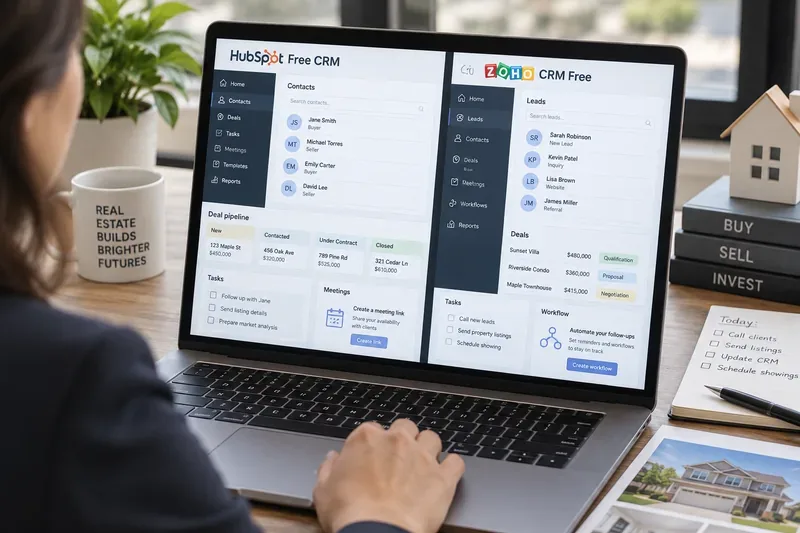
AI-generated illustration of a solo real estate agent comparing CRM options; it is not an actual HubSpot or Zoho product screenshot.
A practical scenario: one agent, one inbox, too many follow-ups
Illustrative example only: Imagine Maya, an independent residential real estate agent. She works alone, has about 450 people in a spreadsheet, and receives new inquiries from referrals, open houses, her website, and property portals. She uses Gmail and Google Calendar. On a normal week, she may be nurturing first-time buyers, following up with homeowners who are months away from listing, and managing several active transactions at once.
Maya is fictional. The numbers and workflow below are not a product test, customer testimonial, or claimed result. They are simply a realistic way to see where the differences between HubSpot Free CRM and Zoho CRM Free become meaningful.
Her CRM needs sound modest: save every contact, remember the next action, track active opportunities, preserve email context, book calls or showings, and store a few real-estate-specific details such as preferred neighborhoods, target price range, preapproval status, and expected move date. That last requirement becomes important when we compare the free editions.
HubSpot Free CRM vs Zoho CRM Free at a glance
Decision point
HubSpot Free CRM
Zoho CRM Free
Free users
HubSpot currently advertises Free Sales tools for up to 2 users.
Zoho Free supports up to 3 users.
Free database capacity
HubSpot's Free CRM FAQ currently states up to 1,000 contacts.
Zoho documents a 5,000-record organization limit across modules in Free.
Core sales structure
Contacts, companies, deals, tasks, activities, and one deal pipeline in Free.
Leads, accounts, contacts, deals, tasks, events, calls, and notes are included in Free.
Email connection
Personal work email can be connected on all plans for one-to-one CRM email and logging, subject to feature limits.
Zoho's current edition table marks IMAP/POP3/Gmail API/Graph API email integration as unavailable in Free.
Meeting scheduling
Free Sales tools include a maximum of one personal meeting link, with HubSpot branding.
Scheduling features exist in Zoho, but the free edition is less compelling if your workflow depends on a deeply connected email/calendar stack; verify the exact calendar feature you need before choosing.
Custom data fields
HubSpot documentation says custom properties are available across plans, with limits depending on subscription.
Zoho explicitly states custom fields are not available in its Free edition.
Sales automation
HubSpot's pricing table places sales automation in paid tiers rather than Free.
Zoho's 2026 edition guide says workflow rules are available in Free with limited actions.
Best zero-cost fit
Agent who lives in email/calendar and wants a straightforward pipeline.
Agent who values a classic lead-management structure and more free records, and can accept Free-edition restrictions.
What happens when Maya receives a new buyer lead?
HubSpot: fewer barriers between the inbox and the contact record
Suppose Maya gets an email from a buyer asking about a condo. With HubSpot, she can connect an individual work email on all plans. HubSpot's current support documentation says a connected inbox can be used to send one-to-one emails from the CRM and log replies. Its email compatibility documentation also lists Gmail, Microsoft 365, Exchange, and IMAP support for core connected-email functions. See HubSpot's connected work email documentation.
That matters for a solo agent because the CRM is useful only if updating it does not become a second job. If Maya can send an email, see the thread on the contact record, create a task, and move an opportunity from one stage to another without copying information between apps, she is more likely to keep the database current.
HubSpot Free also includes one deal pipeline. For Maya, one pipeline may be enough if she uses stages such as New Opportunity, Consultation Scheduled, Active Search or Listing Prep, Offer or Contract, and Closed. HubSpot's current pricing page confirms one deal pipeline in the free Sales tools.
Zoho: a more traditional lead structure, but a key Free-edition email trade-off
Zoho CRM's data model will feel familiar to agents who want incoming prospects to begin as Leads and then convert qualified people into Contacts, Accounts, and Deals. Zoho's Free edition includes those core modules. For Maya, this can make it easy to keep raw portal inquiries separate from people she has actually qualified.
The trade-off is email integration. Zoho's current feature-by-edition table marks Email Integration through IMAP, POP3, Gmail API, and Graph API as unavailable in the Free edition. The same table still lists individual email and email scheduling in Free, so "no email integration" should not be interpreted as "you can never send an email." It means the connected-mailbox experience is more restricted than it is in paid Zoho editions.
For a solo real estate agent whose day begins and ends in Gmail or Outlook, that distinction can outweigh a long feature list.
The hidden real estate issue: fields for buyer and seller preferences
Now Maya qualifies the buyer. She wants to record a $650,000 maximum budget, two preferred neighborhoods, a move-by month, financing status, and whether the buyer needs to sell another home first.
This is where free-edition customization deserves more attention than a generic "features included" checklist. HubSpot's July 2026 property documentation states that custom properties are available across all products and plans, although the number and advanced options depend on subscription. That gives an agent a path to store real-estate-specific attributes as structured fields rather than burying them in notes.
Zoho's official module customization documentation is explicit that custom fields are not available in the Free edition. Zoho provides standard fields and lets users work with its standard modules, but an agent who wants a carefully tailored free CRM schema can hit this limitation quickly.
In Maya's case, this pushes the decision toward HubSpot Free even though Zoho allows more total free records. A larger database is not automatically more useful if the agent cannot structure the information she repeatedly searches and filters.
What about capacity as the contact list grows?
Maya currently has around 450 people, so either product gives her room to start. But the way each vendor defines its free capacity is different.
HubSpot's current Free CRM page says the free CRM supports up to two users and 1,000 contacts. By contrast, Zoho's data storage documentation lists 5,000 records for the Free organization, and Zoho's record-management FAQ explains that the limit applies across the organization's records rather than separately giving 5,000 contacts in every module.
That makes Zoho Free the stronger option on raw record count. But a real estate agent should estimate what counts as a record in the intended workflow. Leads, contacts, accounts, deals, and other CRM records all contribute to how the system is used. If Maya expects her sphere and lead database to pass 1,000 contacts soon, the HubSpot Free limit becomes a practical upgrade trigger. If she expects thousands of mostly simple prospects and does not need custom fields or connected email, Zoho Free has a meaningful capacity advantage.
Follow-up discipline: tasks, meetings, and automation
Most lost real estate opportunities are not lost because the agent lacked a sophisticated dashboard. They are lost because the next call, text, email, or appointment was not handled at the right time. A solo agent should therefore judge a CRM by the friction of creating and completing the next action.
HubSpot Free includes tasks and activities, and its Sales pricing table currently includes one personal meeting scheduling link in Free. HubSpot's meeting scheduler documentation says the meetings tool can connect with Gmail, Office 365, or Exchange calendars so availability can be reflected on a booking page. For Maya, a single link can be enough for buyer consultations, seller discovery calls, or short virtual meetings.
However, do not confuse free task management with full sales automation. HubSpot's September 2026 Sales pricing table places sales automation in Starter and above, not in Free. Free users can still create tasks and manage the pipeline manually, but agents who want multi-step automated follow-up should plan for a paid tier or an external automation tool.
Zoho's 2026 edition-selection guide says the Free edition includes workflow rules with limited actions. That gives Zoho an interesting advantage for some rule-based follow-up scenarios. Yet the practical value depends on which trigger and action Maya needs, and whether the surrounding email/calendar workflow is available in her edition. Zoho's own guide recommends checking the current feature availability because limits differ by edition. See Zoho's edition and role guide.
Which CRM is easier for a solo real estate agent to live with?
If Maya's priority is reducing daily friction, HubSpot Free has the cleaner argument. The combination of contact records, one deal pipeline, connected personal email, email logging, tasks, a mobile app, reporting dashboards, and one booking link covers a large part of a solo agent's routine without requiring a paid subscription on day one.
Zoho CRM Free is not a weaker CRM in a general sense. It is a different free package. It gives up to three users, a traditional lead-to-deal structure, core activities, basic workflow capability, and substantially more free records than HubSpot's stated free contact allowance. That can be valuable for an agent who imports a large older database or who prefers Zoho's sales architecture.
But two Free-edition constraints are unusually important in real estate: no custom fields and no direct mailbox integration through the email protocols/APIs listed in Zoho's comparison table. An agent who constantly filters by budget, geography, property type, financing status, transaction timing, or seller motivation should account for those restrictions before choosing purely on record count.
When the answer flips in Zoho's favor
The comparison changes if Maya is willing to pay for Zoho rather than stay on Zoho CRM Free. Zoho Standard adds capabilities that close important gaps, including custom fields and email integration according to its current edition table. Paid Zoho tiers also expand storage, customization, automation, integrations, and pipeline options.
That means a fair buying decision is not always "HubSpot Free forever versus Zoho Free forever." A better question is: which system gives the agent the best first year and the most acceptable upgrade path? Pricing varies by region, billing cycle, promotions, and packaging, so check the vendor's current Zoho CRM pricing page and HubSpot Sales pricing page before making a cost projection.
A simple decision framework for solo agents
Choose HubSpot Free CRM first if your work revolves around a connected Gmail or Microsoft inbox, you want a shareable scheduling link, one sales pipeline is enough, and you need to add structured fields for real-estate-specific information. It is also a sensible choice when ease of adoption is more important than squeezing the highest possible number of records into a free tier.
Choose Zoho CRM Free first if you prefer separate Leads, Contacts, Accounts, and Deals; you need more than 1,000 records before paying; you may have up to three users; and you can work around the Free edition's custom-field and email-integration limitations. If you already use other Zoho products, the broader Zoho ecosystem may also affect the choice, but verify which integrations are included in your edition.
For our illustrative agent, the winner is HubSpot Free
For Maya's hypothetical workflow, HubSpot Free is the better starting point. Her database is under the current HubSpot free contact allowance, her business is email- and calendar-heavy, and she needs structured buyer and seller attributes. Zoho Free's 5,000-record capacity is attractive, but she would feel the custom-field and mailbox-integration restrictions every day.
If Maya later grows beyond the free contact limit, hires an assistant, builds separate buyer and seller pipelines, or needs automated nurture sequences, she should compare the paid tiers again rather than assuming today's winner remains the best long-term choice.
Before you migrate your spreadsheet
Count contacts and estimate how many new leads you add each month.
List the five to ten real-estate-specific fields you actually need to filter or report on.
Write down the exact inbox and calendar you use, including whether it is Gmail, Microsoft 365, Exchange, or another provider.
Sketch one practical pipeline before creating multiple pipelines you may never use.
Identify which follow-ups must be automated and which can remain task reminders.
Check the current vendor limits immediately before import, because free plans and packaging can change.
For a solo real estate agent, the best CRM is not the one with the longest feature list. It is the one that reliably captures each relationship, keeps the next action visible, and fits the agent's actual communication habits without creating extra administrative work.