Home
» Tips
»
Free Rental Property Expense & Income Tracker Excel Template: A Beginner’s Guide
Free Rental Property Expense & Income Tracker Excel Template: A Beginner’s Guide
Managing one rental property can already mean rent deposits, repair receipts, insurance bills, property taxes, utility charges, and occasional one-off costs. Add a second property, and a simple folder of receipts can become hard to reconcile. A rental property expense and income tracker in Excel gives you one place to record what came in, what went out, which property each transaction belongs to, and what still needs review.
This beginner-friendly approach is about recordkeeping first. It can help you understand monthly cash flow and prepare cleaner records for bookkeeping or tax preparation, but it does not decide whether an item is deductible. U.S. tax treatment can depend on facts that a spreadsheet alone cannot determine.
What should a beginner understand before using the template?
The first useful distinction is between cash flow and taxable rental income. Cash flow is the money actually moving in and out during a period. Taxable income is calculated under tax rules and may include non-cash items such as depreciation or exclude the principal portion of a loan payment from a current deduction.
For U.S. federal tax purposes, the IRS says rental income generally includes amounts received for the use or occupation of property. It also explains that deductible rental expenses can include items such as mortgage interest, property tax, operating expenses, depreciation, and repairs, subject to the applicable rules. The IRS separately warns that improvements generally are not deducted the same way as routine repairs; their cost is typically recovered through depreciation. See the IRS rental income, deductions, and recordkeeping guidance.
Another term worth knowing is Schedule E. In the United States, individual owners commonly use Schedule E (Form 1040), Part I, to report rental real estate income and expenses. The current IRS Schedule E instructions explain the reporting framework. As of September 2026, the IRS publication page available for residential rental guidance is Publication 527 for tax year 2025; check the IRS again when preparing a later-year return because forms and rules can change.
What should you prepare before entering the first transaction?
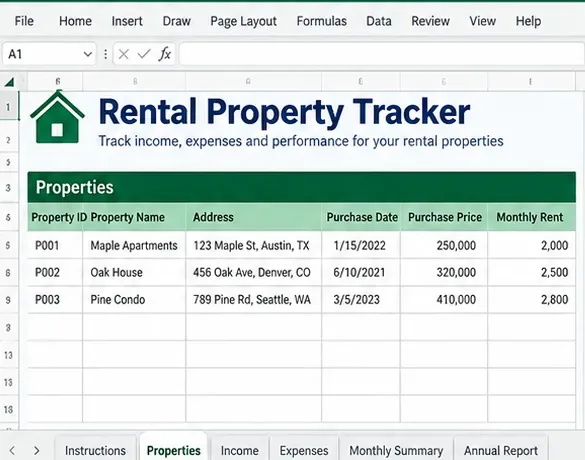
Start with the information that identifies each rental. Give every property a short, consistent Property ID such as P001 or P002. The ID matters because it is easier for formulas to match a stable code than a property name that might be typed differently from one row to the next.
For each property, prepare the address, ownership percentage if relevant, date placed in service if you track it, expected rent, and any notes you need for your own management. Keep purchase price and loan information in a separate property setup area rather than mixing them into the day-to-day transaction log.
AI-generated illustration of a Properties setup sheet with sample data only; it is not a real screenshot or tax calculation.
Then gather source documents: bank statements, rent payment records, invoices, receipts, property management statements, insurance notices, tax bills, and records for repairs or improvements. The IRS says good records should identify receipts, support expenses, help prepare financial statements, and substantiate items reported on a tax return. Documentary evidence such as receipts, canceled checks, or bills may be needed to support expenses.
How should the workbook be organized?
A simple workbook is easier to maintain than a complicated model. A practical structure is:
Properties: one row per rental, with a unique Property ID.
Income: one row per payment or other rental-income item.
Expenses: one row per cash outflow or bill paid.
Monthly Summary: totals by property and period.
Categories or Settings: controlled lists for transaction categories.
Convert the transaction ranges into Excel tables rather than leaving them as loose cell ranges. Microsoft notes that tables group and analyze related data and can expand as rows are added. See Microsoft’s guidance on creating and formatting Excel tables.
For category fields, use data validation drop-downs instead of free typing. A drop-down can reduce variations such as “Repairs,” “Repair,” and “Maintenance repair” when you intended one category. Microsoft documents how Data Validation can restrict a cell to a list of allowed values in its Excel data validation guide.
How do you record rental income correctly?
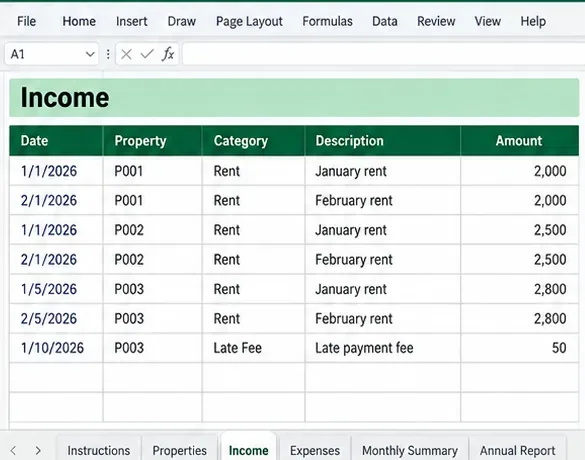
Use one row per income event. Useful columns are Date, Property ID, Category, Description, Amount, Payment Method, Tenant or Source, and Reference. For example, a rent payment and a late fee should normally be separate rows if you want clean category totals.
AI-generated illustration of an Income sheet using sample rental payments and categories; amounts are examples only.
Do not automatically treat every security deposit as income. The IRS states that a deposit you plan to return generally is not rental income when received, while an amount applied as final rent can be treated as advance rent. If part of a deposit is later retained because a tenant failed to meet the lease terms, tax treatment can change. A tracker should therefore give security deposits their own category or status instead of mixing them with monthly rent.
If you receive non-cash rent, tenant-paid owner expenses, advance rent, or lease cancellation payments, the rules can be different from a normal monthly rent deposit. Record the event and keep the source document, then confirm the correct tax treatment rather than forcing it into the nearest category.
How do you record property expenses without confusing cash flow and deductions?
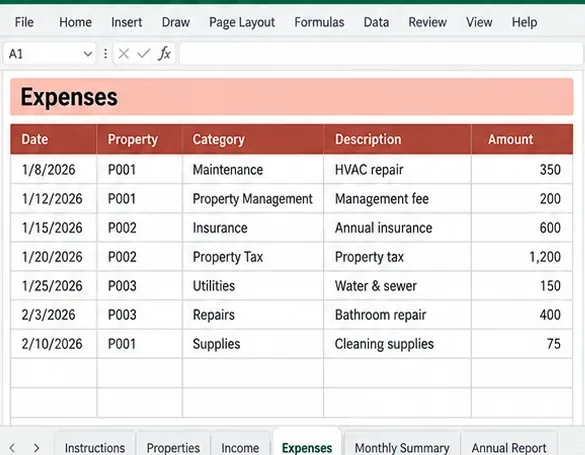
For the expense log, keep columns such as Date, Property ID, Category, Vendor, Description, Amount, Payment Method, Receipt Reference, and Tax Review Status. The last column is useful because “money spent” and “currently deductible expense” are not always the same thing.
AI-generated illustration of an Expenses sheet with sample categories; category names do not by themselves determine tax deductibility.
A common beginner mistake is putting every building-related cost into “repairs.” A repair generally keeps property in ordinary operating condition, while an improvement can involve a betterment, restoration, or adaptation to a new or different use. The IRS notes that improvements are generally recovered through depreciation rather than deducted as an ordinary repair in the year paid. When you are uncertain, label the row “Review” and preserve the invoice instead of making a tax decision inside the workbook.
Likewise, a full mortgage payment should not be treated as one tax-deductible category. For cash-flow management, you may track the full payment as a cash outflow, but tax reporting distinguishes components such as interest from principal. If your main goal is tax preparation, consider separate columns or a separate loan schedule so the workbook does not imply that the entire payment receives the same tax treatment.
How can Excel summarize income and expenses?
Once each row has a Property ID, transaction type, date, and amount, summary formulas can do most of the routine work. The SUMIFS function adds values that meet multiple criteria. Microsoft’s SUMIFS documentation shows the syntax and explains that all criteria ranges should match the size of the sum range.
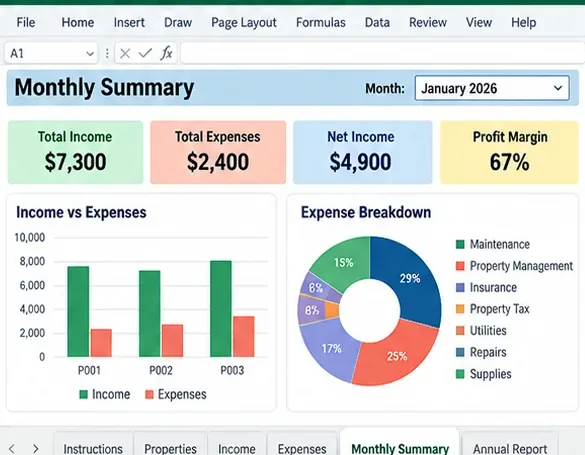
For example, if your transaction table is named Transactions, you could calculate income for the property in cell A2 with a formula such as =SUMIFS(Transactions[Amount],Transactions[Type],"Income",Transactions[Property],A2). A second formula can total expenses for that property, and net cash flow can be calculated as income minus cash expenses.
AI-generated illustration of a monthly summary using sample data. Dashboard figures are illustrative and should not be interpreted as taxable profit.
If you add colors, use them to call attention to workflow states rather than to imply tax conclusions. For example, conditional formatting can highlight missing receipts, blank Property IDs, unusually large transactions, or rows marked “Review.” Microsoft explains that conditional formatting can apply rules based on cell values or formulas.
What monthly routine keeps the tracker useful?
Update the workbook regularly rather than trying to reconstruct an entire year at tax time. A manageable routine is to import or type new transactions, assign each one to a property, attach or reference the supporting document, categorize it, and then compare the tracker with the relevant bank or property-management statement.
At month-end, check four things: total rent received, total cash expenses, any uncategorized rows, and any transactions without documentation. Then compare the totals with bank activity. If the tracker says $4,800 of rent arrived but the bank shows only $4,000 in matching deposits, investigate the difference before moving on.
Which mistakes should beginners avoid?
Mistake
Why it causes trouble
Better approach
Using property names inconsistently
Summary formulas can split one property into multiple labels.
Use a unique Property ID and a drop-down list.
Mixing deposits with rent
Refundable security deposits can have different treatment from rent.
Give deposits a separate category and status.
Calling every cost a repair
Improvements and repairs can receive different tax treatment.
Add a Review status and keep the invoice.
Recording only monthly totals
You lose the transaction-level trail needed to explain differences.
Use one row per income or expense event.
Deleting receipts after entering data
The spreadsheet alone may not substantiate an expense.
Keep the underlying receipt, bill, statement, or other evidence.
Treating dashboard cash flow as taxable profit
Depreciation, loan principal, passive loss rules, personal use, and other adjustments may change tax results.
Use the dashboard for management, then prepare taxes from the detailed records and applicable rules.
How do you know the tracker is ready to rely on?
Do a self-check before you use the workbook for a monthly decision or hand it to a tax professional. Pick one property and one month. Reconcile every rent receipt to a bank or management statement. Then reconcile every expense row to a receipt, invoice, or payment record. Confirm that the Property ID is present, categories come from your approved list, and no transaction has been counted twice.
Next, compare your summary formulas with a manual total for a small sample. If the manual total and Excel total disagree, inspect table ranges, dates, signs, filters, and category labels before trusting the dashboard. A reliable tracker should let you move from a summary number back to the individual transactions that created it.
For U.S. users, also compare your categories with the latest Schedule E and Publication 527 guidance before filing. For users outside the United States, the workbook can still serve as a recordkeeping system, but tax categories and reporting rules should be adapted to your jurisdiction.
When is a simple Excel template no longer enough?
Excel works well when you want a transparent, low-cost record of a modest number of properties and transactions. Consider dedicated accounting or property-management software when you need automatic bank feeds, tenant portals, security-deposit ledgers, multi-user approval workflows, accrual accounting, large portfolios, or detailed audit controls.
The goal is not to make the workbook complicated. It is to make every number explainable. If each summary total can be traced to a property, a transaction, and supporting evidence, the tracker is doing its job.